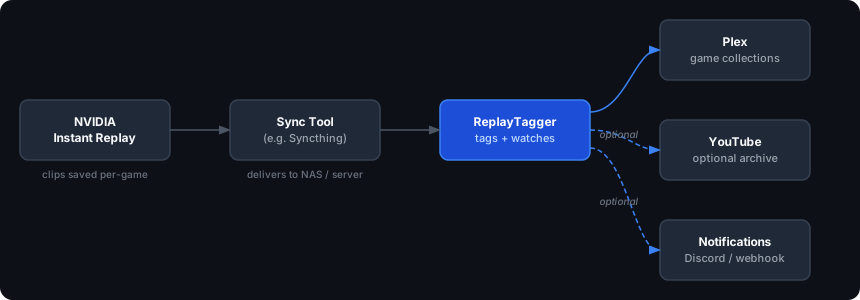
ReplayTagger watches your clips folder and tags every file with its game, so Plex builds a clean per-game collection for you. No re-encoding. No manual sorting. No cloud.
Your capture software already saves clips into a folder per game. ReplayTagger reads those folder names and turns them into Plex collections, with nothing to rename by hand.
Once it's running, you never touch it again. New clips get tagged the moment they land.
A clip lands in a per-game folder on your gaming PC.
A tool like Syncthing delivers it to your server.
ReplayTagger writes the game name into the clip's genre metadata with ffmpeg.
Plex reads the tag and drops the clip into the matching game collection.
One container, your hardware, your rules.
ffmpeg remuxes to a temp file, atomically replaces the original, and restores its timestamp. Identical bytes except the tag.
NVIDIA, OBS, AMD ReLive, or anything that saves clips into per-game subfolders. The folder name is all it needs.
One Docker container on your NAS or homelab box. It just needs network access to Plex and the clips folder.
Queue uploads automatically. Each file is fingerprinted so it's never uploaded twice, even after a rename.
Fire a notification when clips are tagged or uploaded, including ntfy and other webhook targets.
MIT licensed, built for homelab and self-hosted setups. No accounts, no telemetry.
Already running Plex and Docker? Copy-paste this.
# grab the compose file and env template curl -O https://raw.githubusercontent.com/iamclements/replay-tagger/main/docker-compose.yml curl -O https://raw.githubusercontent.com/iamclements/replay-tagger/main/.env.example && mv .env.example .env $EDITOR .env # set CLIPS_DIR, PLEX_URL, PLEX_LIBRARY_NAME docker compose run --rm replaytagger plex-auth # guided login, saves the Plex token docker compose run --rm replaytagger doctor # verify connectivity, ffmpeg, paths docker compose up -d # tag clips, then watch for new ones
No. ffmpeg only remuxes the container to write a metadata tag, then atomically replaces the original and restores its timestamp. The video and audio streams are copied bit-for-bit, so there's no quality loss and no extra disk churn.
Anything that saves clips into per-game subfolders: NVIDIA Instant Replay, OBS, AMD ReLive, and others. ReplayTagger reads the folder name as the game name, so no integration or game database is required.
It runs entirely on your hardware and talks to your local Plex server with a token you generate during setup. There are no accounts, no third-party services, and no telemetry. The optional YouTube archive is the only feature that reaches the internet, and it's off by default.
Docker on any NAS or Linux host, a running Plex server, and a clips folder reachable by the container. The built-in doctor command checks connectivity, ffmpeg, and paths before you go live.
Yes. MIT licensed and fully open source. Read every line, fork it, or open a PR.